Failed Investigation of ~50 TB of Data Upstreamed Spanning 4 Months
Sensitive identifiers (WAN IPs, MACs, hostnames) have been anonymized.
Accountability Statement
This investigation followed AI/LLM guidance that placed the capture on a LAN branch, not the WAN path. I did not recognize this limitation at the outset. The resulting dataset was incapable of answering the attribution question. This report corrects the record and documents the proper WAN‑capture requirements for any future incident.
Executive Summary
- The ISP/router application (Eero) reported ~50 TB of uploaded data across ~June–September, peaking in August.
- I attempted to capture network traffic from a SPAN port on a Netgear GS108E.
- This capture configuration was implemented per generic AI/LLM guidance, which never observed the router’s WAN link and therefore could not attribute the ISP‑reported uploads.
- After contacting ISP support, usage returned to normal without changes to the LAN. The root cause of the reported upstream remains inconclusive; an ISP‑side metering/mapping issue or update to router firmware is plausible, but unproven.
- Main lesson: Do not rely on AI instructions for unfamiliar domains. Not understanding what tools & equipment I had on hand, their limitations (i.e. bottlenecks), as well as how to configure them, was my biggest blunder.
Lessons Learned (Primary)
- Do not trust AI to instruct you in unfamiliar domains without verification.
- Segment and timing is key; volume establishes baselines.
- Consumer devices lack many features (or cost a lot of $$) that many enterprise-level devices have out of the box.
Scope
- ISP/router application (Eero) totals:
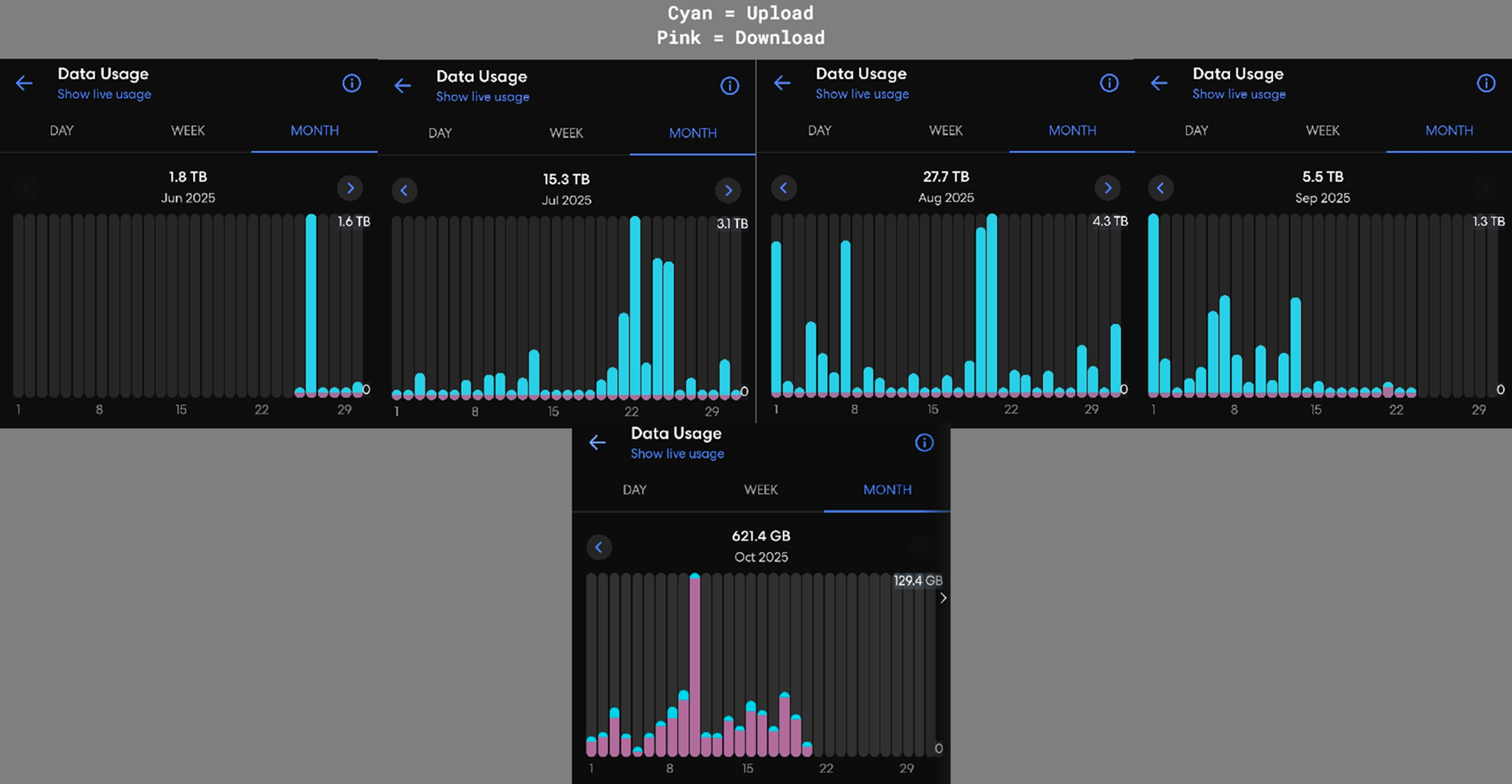
Eero’s usage graph
- Packet captures (pcaps): Intermittent captures between ~27 Aug and 19 Sep, collected on a mirrored LAN port (GS108E).
Timeline and Data Sources
- Late Aug–Mid Sep: I begin capturing after noticing the anomaly late August.
- June–September: ISP app shows unusually high uploaded data, peaking in August.
- Post‑support (mid-Sept through October): Usage appears normal; included only to illustrate normalization after ISP contact.
Network Topology (relevant elements)
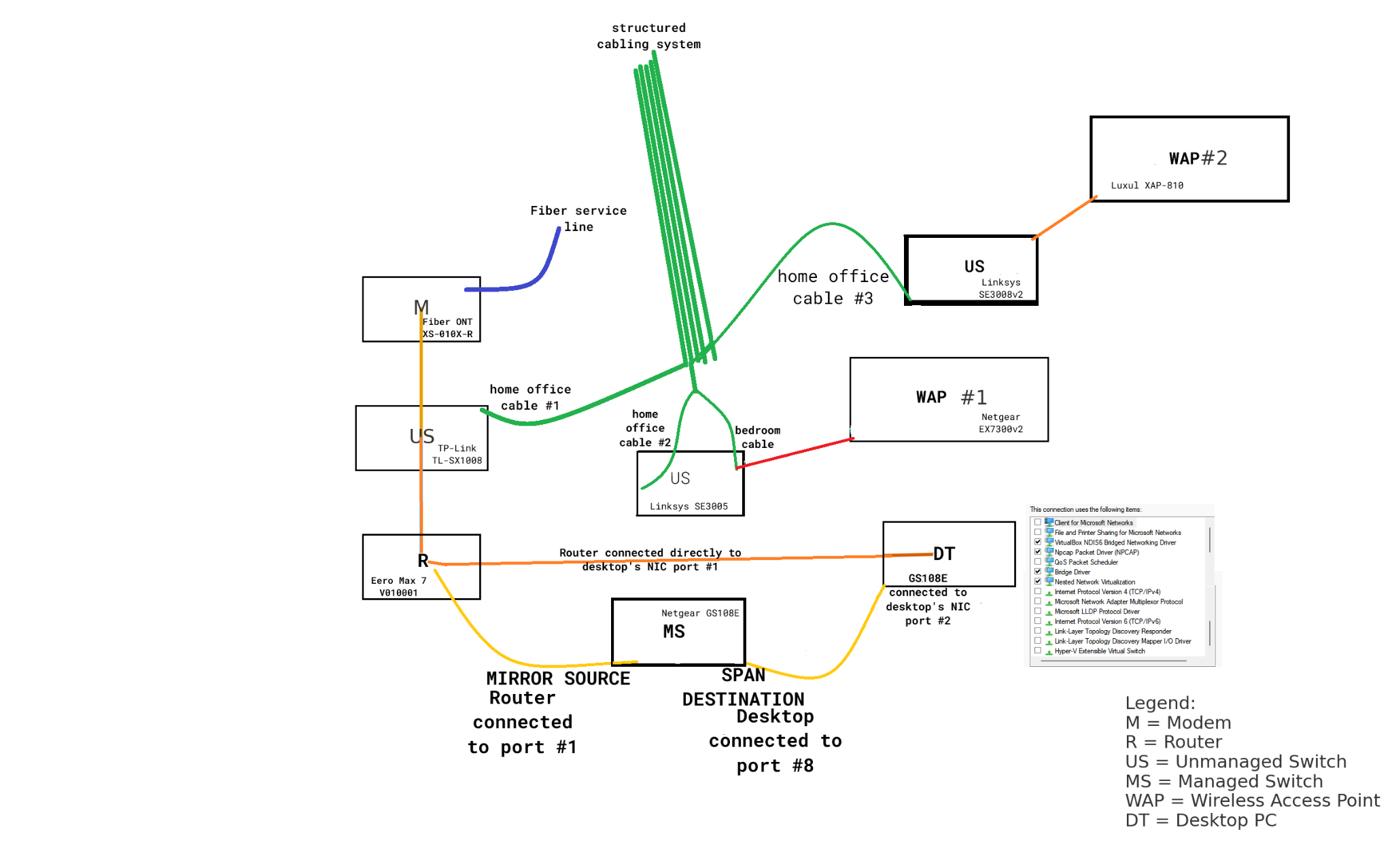
- ONT: ZTE XS‑010X‑R (fiber)
- Unmanaged 10G switch (WAN chain): TP‑Link TL‑SX1008 (between ONT and router)
- Router: Eero Max 7 (WAN and LAN)
- Managed switch (SPAN source): Netgear GS108E (1 Gbps)
- Other LAN switches: Linksys SE3005, SE3008v2 (1 Gbps)
- WAPs: Netgear EX7300v2 (“WAP #1”), Luxul XAP‑810 (“WAP #2”)
- Capture host: Desktop with dedicated NIC (1 Gbps) for SPAN
- SmartHome Environment: There are approximately 20+ IoT devices on the network (Smart TVs, tablets, phones, etc.)
Coverage matrix
| Path / Segment | Captured? | Notes |
|---|---|---|
| WAN: ONT ↔ Eero (via TL‑SX1008) | No | Unmanaged switch; no mirror; GS108E not inline |
| Eero internal Wi‑Fi ↔ Internet | No | Bridged inside router then out WAN |
| Eero LAN ↔ GS108E ↔ SE3008v2 ↔ WAP #2 | No | Bypasses GS108E mirror |
| Eero LAN ↔ SE3005 ↔ WAP #1 | No | Bypasses GS108E mirror |
| Eero LAN ↔ Desktop NIC port #1 (direct) | No | Bypasses GS108E mirror |
| Eero LAN ↔ GS108E port #1 (mirror source) | Yes | Mirrored local segment chatter |
| Desktop NIC port #2 ↔ GS108E port #8 (SPAN Destination) | Yes | Receive-only capture feed |
Consequence: All traffic captured was only LAN. None captured WAN interface where the ISP measured 50 TB.
Tools & Scripts
- tshark / dumpcap – packet capture and rotation (ring buffer)
- Wireshark – visual inspection of flow distribution
- nmap / arp-scan – endpoint enumeration
- AI-assisted parsing scripts (triage_parser.py, ip_extractor.c) & network configuration
Methodology Origin and Limitation
The capture topology (SPAN on GS108E mirroring the router’s LAN port) was set up following generic AI/LLM guidance. This vantage:
- Excluded the WAN path entirely.
- Excluded several LAN nodes (Eero Wi‑Fi clients; SE3005/WAP #1; SE3008v2/WAP #2).
- Operated at 1 Gbps on the SPAN switch, while the service is ~5 Gbps.
Therefore, the lab itself was incapable by design of capturing the ISP’s WAN‑edge traffic to attribute the massive upload spikes.
Observations From Available Data
- The ISP app listed certain phones and a few other devices as “top uploaders.” Given private/randomized MACs, DHCP churn, and ARP aging, these labels are advisory. Without WAN visibility or MAC verification during the spike, they cannot be treated as evidence.
- Disconnect tests (e.g., cameras) during capture windows produced no drop. Given the non‑WAN vantage and uncertain overlap with spikes, these tests are non‑conclusive.
- After contacting ISP support, anomalous usage ceased without LAN changes. This is consistent with a provider‑side metering or mapping fix, but cannot be proven from these pcaps.
Why the 50 TB Anomaly Cannot Be Attributed From Captured Traffic
- Segment mismatch: ISP total is counted at WAN; pcaps are from a LAN branch.
- Coverage gaps: WAN flows were unobserved.
- Timing and scale: The hope of this investigation was a hail mary at best since I have to professional experience as a SOC Analyst, notwithstanding that I began monitoring and capturing after detection.
- Per‑device app data is not authoritative: Without stable L2 identifiers and WAN vantage, device attribution cannot be confirmed.
Bottom line: The dataset cannot, even in principle, identify which device or service produced the ISP‑reported upstream usage.
What Would Have Worked (Given ~5 Gbps)
To observe the WAN at line rate and attribute egress:
- Managed multi‑gig switch inserted in the ONT ↔ Router path with port mirroring on the ONT and/or Router‑WAN ports.
Operational notes:
- Confirm that all devices used for network monitoring can support ≥5 Gbps.
Appendix — Evidence
- Summary of data parsed from pcaps (Traffic intermittently captured beginning Aug. 28th through Sept. 19th, with & without capture filter)
| Metric | Value |
|---|---|
| Total packets | 263,704,493 |
| Total bytes | 77.57 GiB (83,295,410,607 bytes) |
| Internal IP | External upload bytes |
|---|---|
| 192.168.x.x | 6.12 GiB |
| 192.168.x.x | 4.51 GiB |
| 192.168.x.x | 1.57 GiB |
| 192.168.x.x | 244.90 MiB |
| 192.168.x.x | 165.64 MiB |
| 192.168.x.x | 62.98 MiB |
| 192.168.x.x | 58.03 MiB |
| 192.168.x.x | 48.60 MiB |
| 192.168.x.x | 38.84 MiB |
| 192.168.x.x | 34.19 MiB |
| Internal IP | External download bytes |
|---|---|
| 192.168.x.x | 456.45 MiB |
| 192.168.x.x | 328.48 MiB |
| 192.168.x.x | 216.94 MiB |
| 192.168.x.x | 178.01 MiB |
| 192.168.x.x | 161.46 MiB |
| 192.168.x.x | 130.94 MiB |
| 192.168.x.x | 115.99 MiB |
| 192.168.x.x | 49.50 MiB |
| 192.168.x.x | 47.32 MiB |
| 192.168.x.x | 35.10 MiB |
| Port | Protocol (likely) | Packets |
|---|---|---|
| 53 | DNS | 199,210,643 |
| 443 | HTTPS/TLS or QUIC | 34,883,389 |
| 67 | DHCP server | 2,044,532 |
| 5353 | mDNS | 1,413,582 |
| 60080 | HTTP alt | 1,216,679 |
| 34446 | Vendor/IoT (nonstandard) | 1,171,600 |
| 123 | NTP | 512,358 |
| 5223 | Apple Push (APNs) | 503,165 |
| 41616 | Vendor/IoT (nonstandard) | 407,207 |
| 59398 | Ephemeral | 405,283 |
| 57837 | Ephemeral | 213,338 |
| 8009 | Google Cast | 201,058 |
| 55744 | Ephemeral | 198,933 |
| 3478 | STUN (WebRTC/VoIP) | 195,999 |
| 53216 | Ephemeral | 168,029 |
| 42716 | Ephemeral | 162,984 |
| 35314 | Ephemeral | 159,790 |
| 51454 | Ephemeral | 155,007 |
| 1900 | SSDP | 146,135 |
| 59720 | Ephemeral | 144,351 |